
Log the flight once. No copying after flying.
ato.aero is a system for flight schools and aero clubs that runs training (ATO, DTO), the fleet and maintenance records (CAO/CAMO). The instructor logs the flight once, right after it, even without signal. The training record, the tech log entry and the billing line come from that single entry, instead of three copied out in the evening.
From the first student to leaving the airfield
- Before the flight
You know what you are practising today
Open the student and see which exercise they flew last, what went poorly and how many flights and minutes are left to the minima. The app suggests the next exercise. No card from the cabinet, no call to the previous instructor.
- At the aircraft
One entry, while you still remember
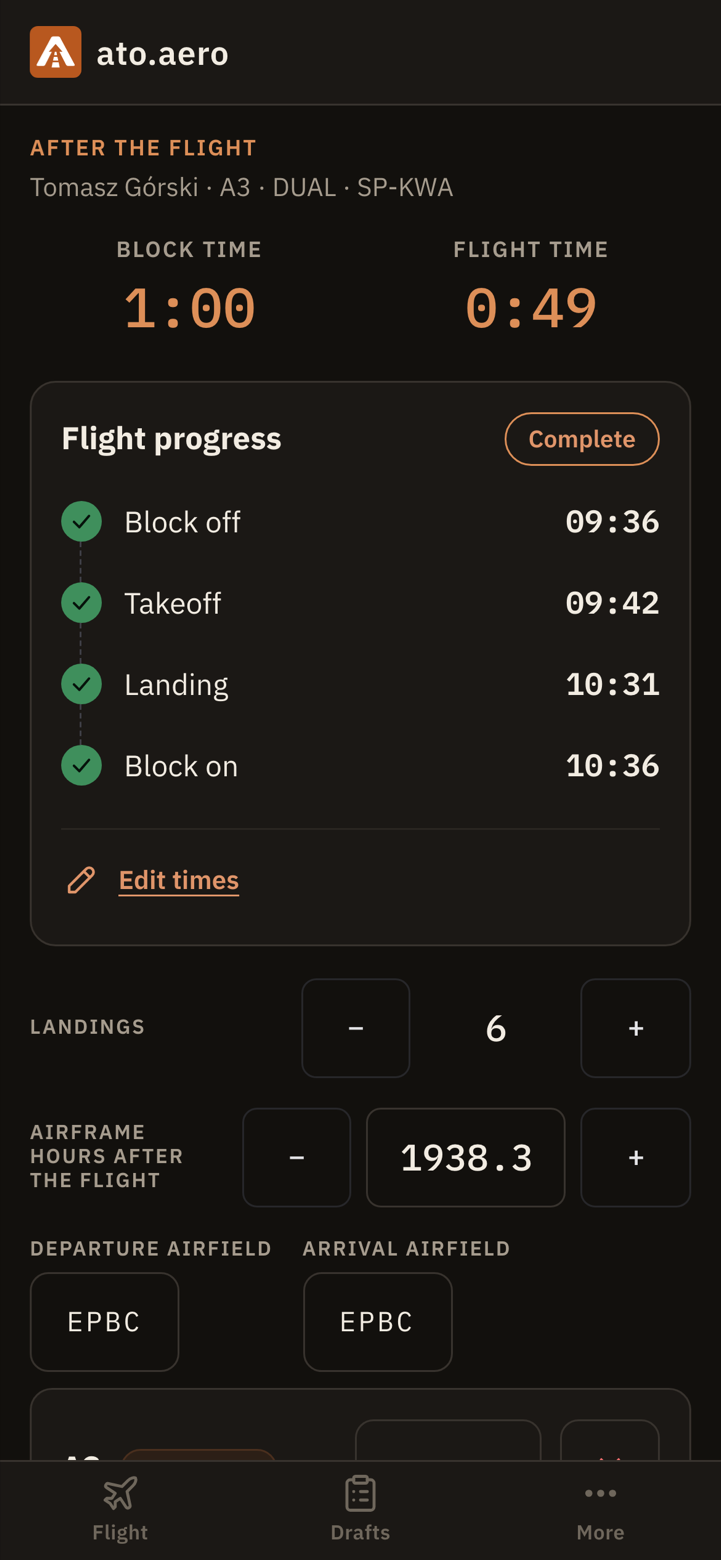
Right after engine shutdown: times, landings, aircraft counters, what was passed, and a remark typed or dictated before the next student arrives. Split a flight across several exercises with a slider; the totals add up by themselves.
- End of the day
The rest happens on its own
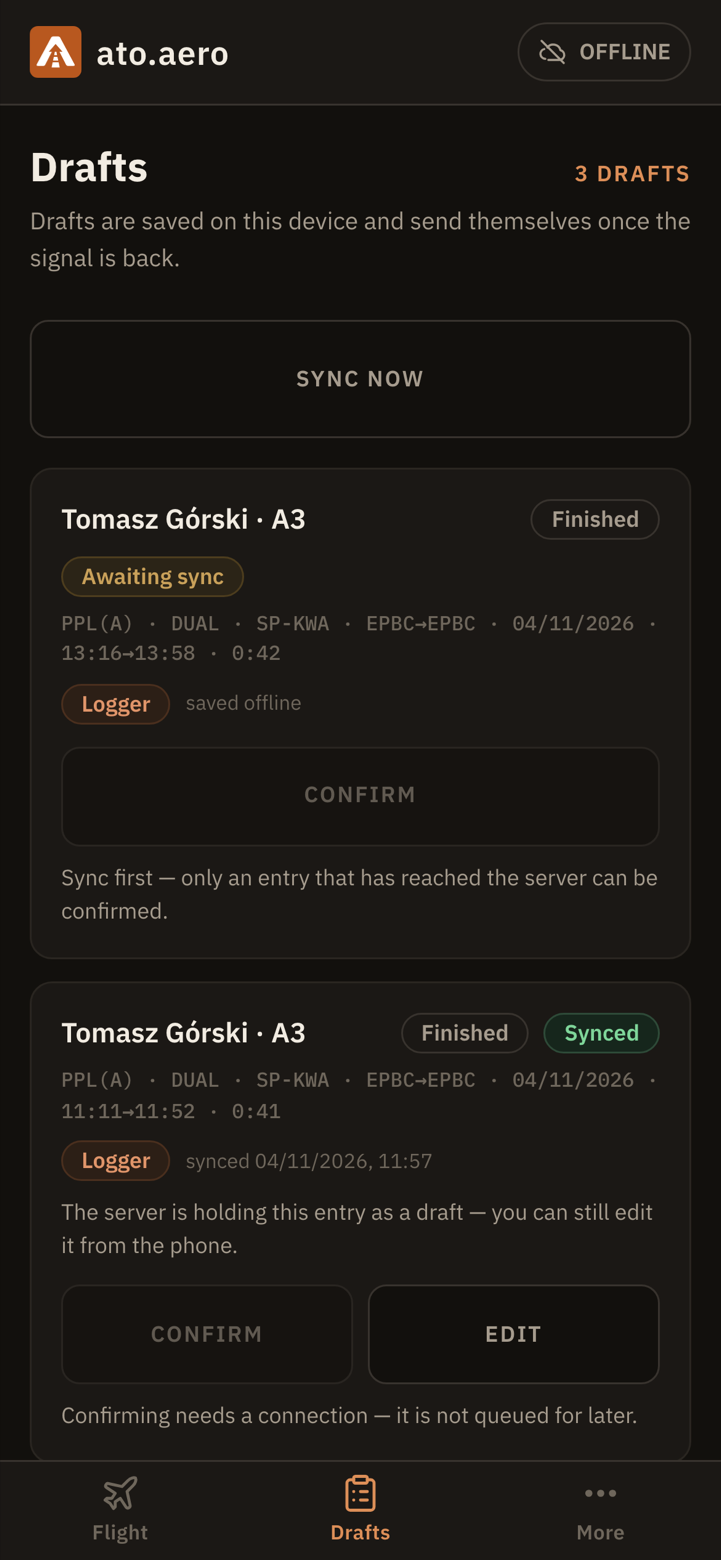
One entry produces the training record, the tech log entry and the billing line. Without signal the draft waits on the phone and sends itself when the network returns.
- A training flight and the tech log entry are one form: the instructor enters times and counters once, as pilot in command.
- The instructor confirms the training part of the entry when there is a moment at the desk. Aircraft counters update as soon as the draft syncs, without waiting for that confirmation.
- While the entry is offline, only the instructor who made it can see it. Once synced, the draft is in the queue and in the aircraft log.
Works where there is no signal
The mobile app keeps drafts on the phone and sends them when the network returns. Every draft shows its sync state, so you know what is already on the server and what is still waiting. Finger-sized controls, every value typed without aiming.
Nobody guesses how it went
A remark written during the flight or right after it is specific. Everyone who needs it reads it, not only the person who wrote it.
The next instructor
Reads the remarks from the previous flight before getting in with the student. Has the previous instructor's assessment, not only the student's account.
Head of Training
Sees the draft queue, overdue entries and every student's progress against the programme. No chasing missing entries, because the waiting ones are visible.
The student
Sees their own remarks and progress against the minima. Knows what to work on before the next flight.
Less chaos, more control over fleet airworthiness
Instead of a paper tech log, spreadsheets and chasing pilots: every flight updates hours and cycles, and the technical staff keep the maintenance history and upcoming work in the same system. How far paper is replaced in your procedures is agreed during onboarding.
- 100 h inspection96:40 / 100:003:20 of flight time left
- Annual inspectionin 62 dayscalendar due date
- ELT battery replacementin 14 monthscalendar life limit
- AD 2025-08-12compliedstaff recorded compliance on 7 of 7 aircraft
The tech log in your pocket
After the flight the pilot signs the tech log entry on the phone in under a minute: times, landings, counters, fuel and a defect, even without signal. The entry feeds the aircraft hours and cycles.
Live maintenance status
Hours and cycles come from the pilots' entries. Calendar dates, AD/SB requirements, component life limits and work performed are entered by staff, and the system counts from them how much is left to the next item. Deferrals, releases to service and aircraft logbooks are kept in the same place. The decisions are yours.
An audit pack in one click
Aircraft list and status, AD/SB register, tech logs, maintenance programme and the ARC recommendation. When the authority books a visit, you export the pack to PDF from one screen, with no digging through binders.
Free slots are visible, moves need no phone calls
The instructor plans a student's day without a round of calls to find out whether someone will give up the aircraft for an hour.
- The fleet timeline on the phone: you see free slots on every aircraft, not only your own bookings.
- Moving a flight without a round of calls: the system sends a text message asking to confirm a change of time or aircraft.
- A booking is not lost to an inspection nobody knew about: aircraft in maintenance and the next due date are visible in the schedule.
What the person responsible for the organisation sees
- The queue of drafts waiting for confirmation and entries that got stuck.
- Every student's progress against the programme minima: which trainings are stalled and why.
- Flights flown in the period and what is still to be settled with a student or an instructor.
- Aircraft in maintenance and deferred defects, visible in the fleet plan.
The desktop panel shows the state of training, fleet and billing from the same entries instructors make at the aircraft. No separate report prepared at the end of the month.
You have students halfway through training. We know.
Changing systems mid-season must not stop the flying. That is why we do the migration, not your staff after hours.
We do the migration
Ongoing trainings, students' flight time to date, the fleet and the staff are entered into the system by us. You hand over the documents, we enter them.
Programmes and pricing ready on day one
We configure your training programmes with exercise minima, your price list and billing rules. On the first day an instructor opens a student and sees where they stand.
Staff invited, first flights with us
We invite instructors and students, show the flight entry at the airfield and stay at hand for the first confirmations.
Four questions your Head of Training will ask
Can I reconstruct the history of an entry?
Yes. The system keeps every version of an entry, each with its author, role and time. A correction never overwrites the previous one.
Who confirms and who corrects?
The instructor saves the draft and confirms it themselves. After confirmation a correction is a new version with a stated reason, shown beside the previous one.
What can I export?
The student's record to PDF, the flight log and billing to XLSX and PDF, the fleet audit pack to PDF. At the end of the contract, a full export of the organisation's records in a documented format.
Where is the data and who controls it?
The organisation remains the data controller and can export its data at any time. Each one has its own isolated database on servers in the EU. We process the data under a data processing agreement and are responsible for backups, updates and the encrypted connection.
You pay per flight hour, not per licence
Our revenue grows only when your fleet flies more. The figures come in the offer for your organisation.
Per flight hour
One rate covering training and maintenance together. No licence fees, no per-user fees.
Zero onboarding fee
Data migration, programme and pricing configuration are included.
Annual fee cap
Once it is reached, further hours in the year are no longer charged. The better the season, the sooner the system stops costing.
Low winter bills
The cost grows with flight time. A weaker year means a lower bill, with no renegotiation.
We fly and we write code
ato.aero is built by professional pilots and active flight instructors together with software engineers. We check the screens at the airfield, not only in the office.
See one entry travel through the whole system
A short online demo on a sample organisation, then an offer for yours. As one of the first customers you will have a strong say in where the platform goes.